Guild Wars Build Templates on Mac: Import & Export
Move your Guild Wars build templates from a Windows install to your Mac, import codes from the clipboard, and export a backup you can keep.
Guild Wars saves each build as a short template code. On Windows those are .txt files under Documents\Guild Wars\Templates, so you can copy them between machines. On your Mac they live inside the game's own storage, where Finder cannot reach them — so GWonMac gives you a way in and out under Settings → Templates.
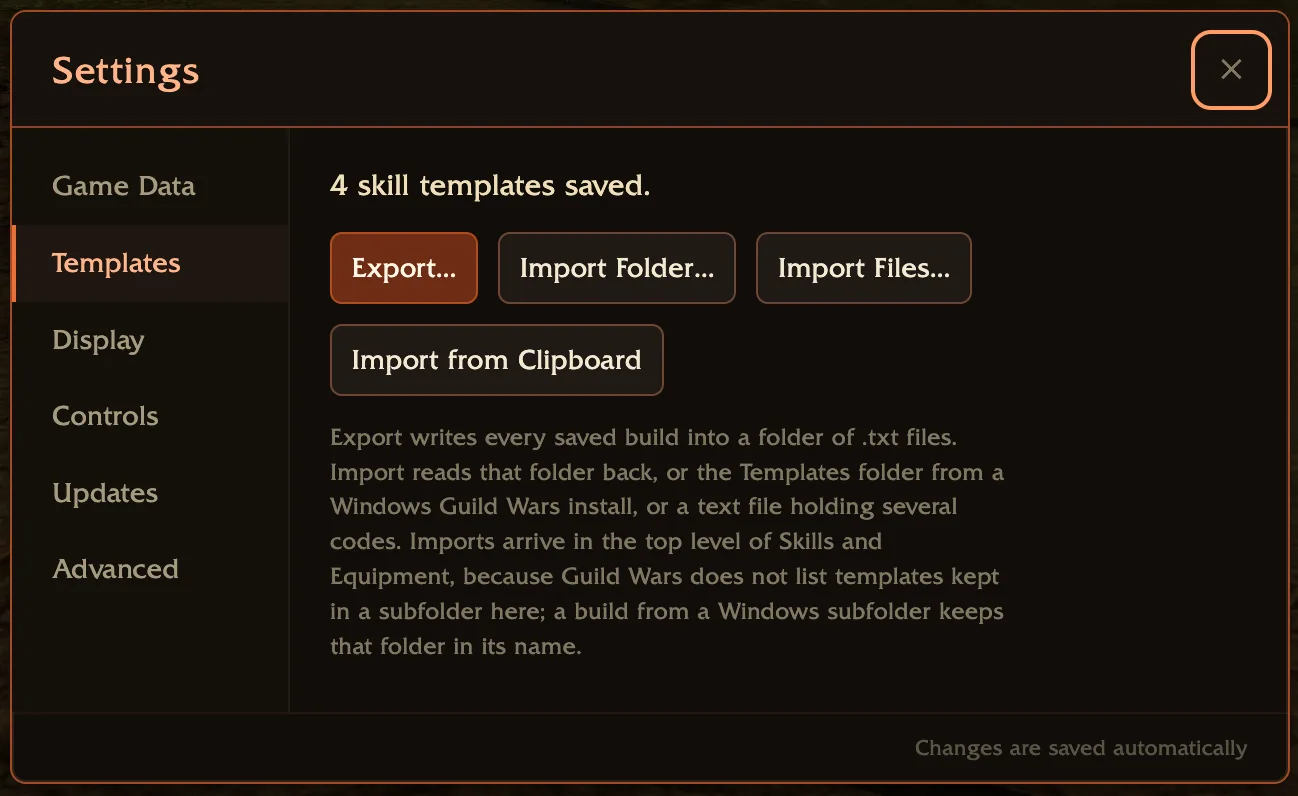
Wait until Guild Wars has finished starting and you have signed in before using the pane. If you opened Templates earlier, reopen the pane after signing in so it can reconnect to the game's storage. Before then the pane gives you that instruction instead of showing buttons that cannot do anything.
Bring your builds over from Windows
If you played on Windows — on a PC, in Parallels or VMware, or through CrossOver — your builds are already .txt files. Copy the Guild Wars folder (or just its Templates folder) to your Mac, then:
- Start Guild Wars, sign in, then open Settings → Templates.
- Choose Import Folder… and pick the folder.
- Read the preview, then confirm.
You can point it at Guild Wars, at Templates, or straight at Skills — all three land the same builds in the same places.
Import a code someone shared
Import from Clipboard reads codes you copied from a guild page, a wiki, a forum post, or a chat message. It recognises a code on its own, Name: code, Name + tab + code, and the [Name;code] form builds are usually shared in. Several codes at once is fine, and skill and equipment codes are filed correctly on their own.
A pasted code carries no name, so the preview offers a Name field. Type one and it is used as it is; paste several codes and they are numbered from it. Leave it empty and they arrive as Template 1, Template 2. A code that came with its own name keeps that name.
Import Files… does the same for individual .txt files, including a single file holding many codes.
Export a backup
Export… asks where to put it and writes a Guild Wars Build Templates folder: one .txt per build, filed under Skills and Equipment. It is the same layout Windows uses, so what you get is a backup you can keep, a way to move builds to another Mac, and a folder a Windows install can read.
An export never writes into an earlier one — a second export becomes Guild Wars Build Templates 2, so nothing you already saved is overwritten.
Restoring is just importing that folder again.
Nothing is written until you confirm
After you pick a source, the pane shows what would be imported, what it would skip and why, and what to do when a name is already in use — Keep Existing or Replace. Keep Existing is the default, and builds you already have are skipped either way, so re-importing the same folder changes nothing.
Names the game refuses are adjusted rather than dropped, and the preview says how many: Me/E Domination arrives as Me-E Domination.
Imports land in the top level
Guild Wars lists only the templates directly inside Skills and Equipment. It will show you a subfolder, but it never reads what is inside one it did not write itself — so a template imported into a subfolder would be saved, would show up in an export, and would never appear in the game's list.
Every import therefore lands in the top level, and a build from a Windows subfolder keeps that folder as part of its name: Warrior\Shockaxe arrives as Warrior - Shockaxe. Because the list is alphabetical, those stay grouped together.
That also means the game's limit of 550 templates per kind applies to everything you import. Subfolders are the documented way around that limit on Windows, and they cannot be used for it here.
If templates are stuck in a folder
If a template is already sitting in a folder Guild Wars cannot read — left by an earlier version of GWonMac, or written by the game itself — the pane says so and offers Move to Top Level.
That is the only way out, because the game cannot list such a template and therefore cannot rename or delete it either. Moving keeps the folder name as part of the template name and tidies the empty folder away. If the new name is already taken by a different build, that one is left alone and reported rather than overwriting either copy.
The offer only appears when there is something to move.
Related
- Troubleshooting & known issues — including what happens to templates when ArenaNet updates the client
- Upstream requests to ArenaNet — the client defects behind template saving